


ShopFever
4.354.00 Reviews
App Specs
- Version
- 2.9.7
- Updated On
- License
- Free
- Downloads
- 100,000+
- Developer
- ShopFever
- Categories
- Shopping
- Platform
- Android
Screenshots

 Analysis by AppCompare
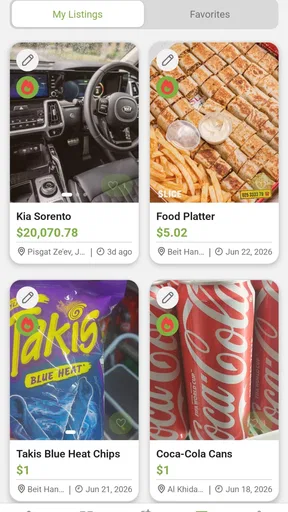
Before installing any shopping marketplace, I like to know what a first visit is likely to involve: browsing, listing something, or deciding whether the app suits the way I shop. ShopFever is a free shopping app from ShopFever for people looking to buy or sell new and used goods with little fuss. That broad purpose makes it worth considering for bargain hunters and anyone clearing out items, though it is not the same proposition as a fashion-only shop with a defined catalogue.
What to expect from a mixed marketplace
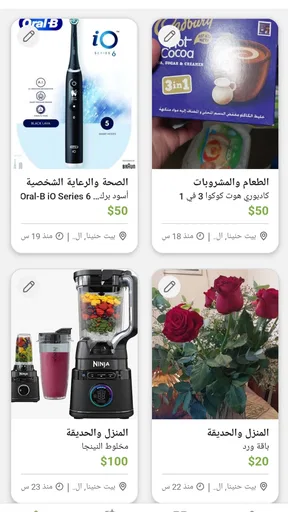
The important distinction is that ShopFever is built around transactions between people as well as shopping for new products. That can be useful when you want to compare second-hand finds with new items, or when a household object you no longer need might be useful to someone else. It also means the experience depends on what sellers have listed and how clearly they describe their goods, rather than on one retailer’s fixed range.
I would approach the first browsing session with a specific need in mind. Searching for a particular type of item gives you a practical way to judge whether the available listings are relevant, instead of scrolling without a goal. Before committing to a purchase, read the listing carefully, check the condition and any included accessories, and ask the seller about details that matter to you. Those small checks are especially important for used goods.
Getting started without overcomplicating it
ShopFever is rated for Everyone and works on Android 6.0 and later. It was released on October 18, 2020, and version 2.9.7 is the current version. The app has more than 100,000 installs and an average rating of 4.3 from around 4,500 ratings, which gives a newcomer some context about its audience without telling you whether the listings near you match your needs.
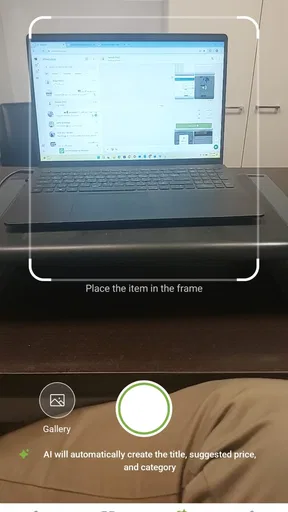
For a useful first session, I’d start by deciding whether I’m there to buy or sell. If I’m shopping, I’d pick one concrete item and compare the available descriptions rather than treating the first result as the best option. If I’m selling, I’d prepare the item first: note its condition, gather any parts that belong with it, and take clear photos before writing the listing. That makes it easier to describe what a buyer will actually receive.
Turn browsing into a first successful action
A good first result does not have to mean an immediate purchase. You might find a suitable used item, confirm that a new product is available, or learn that the choices are too limited for your current need. I count that last outcome as useful too: it prevents a rushed decision and helps you decide whether another marketplace or a specialist retailer is a better fit.
If you are listing something, begin with an item whose condition you can describe confidently. Be specific about wear, missing parts, and what is included; clear expectations can save both you and a prospective buyer time. For a buyer, the equivalent habit is to resolve uncertainty before arranging a deal. With second-hand shopping, a low price is only a good find when the item is suitable and the handover or delivery arrangements make sense.
Worth Reading Before You Choose

EA SPORTS FC Mobile 26 Is a Bigger Football Game, but It Takes Time

Flipboard Shows What News Apps Must Do Beyond the Feed

Switching to Android Auto Means Rethinking Your Driving Routine

Google Calendar Makes a Crowded Week Easier to Manage

Ludo King Makes the Most of the Minutes Between Plans

Baby Panda World Brings Quick Play to Modern Phones, but Its Game Library Feels Busy
Where a little caution pays off
Because new and used goods can sit in the same broad shopping context, I would not assume every listing follows the same standards or offers the same level of reassurance. Check who is offering the item and what the description actually promises. If a detail affects safety, compatibility, or value, ask before paying rather than filling in the blanks yourself.
ShopFever is free to install, with in-app purchases listed from $1.99 to $129.99 per item. I would keep that distinction in mind: downloading the app is free, but that does not mean every transaction or optional purchase is cost-free. Its developer is ShopFever, and the app has 54 reviews alongside its broader rating count. I’d treat those signals as context, not as a substitute for checking an individual listing and deciding whether it suits me.
Who will get the most from it
This is most appealing if you are comfortable weighing individual listings and want one place to browse new and pre-owned products. It can also make sense when you are decluttering and would rather offer usable things to another person than leave them unused. Someone who wants a tightly curated range, a familiar retail returns process, or a highly predictable catalogue may be better served by a conventional retailer or a specialist resale service.
For example, if I needed a replacement household item after work, I’d search for that exact item, compare condition and what is included, then contact the seller to settle any important questions before agreeing to buy. If the listings were vague or the options did not meet my needs, I would stop there and check a retailer with a clearer product specification. That approach keeps the app useful without letting a tempting price rush the decision.
Ever found yourself in a shopping frenzy, hunting for the latest trends without leaving the comfort of your couch? Well, that’s exactly where ShopFever steps in, offering a seamless shopping experience right at your fingertips. Let’s dive into what makes this app a must-have for fashion enthusiasts and bargain hunters alike.
Discovering a World of Fashion
When I first launched ShopFever, I was greeted by an intuitive interface that made navigation a breeze. The app boasts a vibrant design, reflecting its colorful personality and focus on fashion. As someone who loves to keep up with the latest trends, I was thrilled to find a plethora of options neatly categorized. From chic streetwear to elegant evening gowns, the variety is endless.
One of the standout features is the personalized recommendation system. The app quickly learns your preferences, suggesting items that align perfectly with your style. It’s like having a personal shopper who knows exactly what you love. I was genuinely impressed by how accurate and tailored these suggestions were.
Deals, Discounts, and More
If you’re anything like me, snagging a good deal gives you a thrill. ShopFever doesn’t disappoint in this department. The app is bursting with discounts and exclusive deals that make shopping even more exciting. I found myself checking the app daily, not wanting to miss out on limited-time offers.
Additionally, the app features a loyalty program that rewards frequent shoppers. This means the more you shop, the more perks you unlock. From free shipping to early access to sales, the benefits are well worth it. It feels rewarding and keeps you coming back for more.
User-Friendly Shopping Experience
Navigating through the app is smooth and hassle-free. With a few taps, you can filter items by size, color, brand, and price range, ensuring you find exactly what you’re looking for without any fuss. The search feature is robust, allowing you to pinpoint specific items or explore new trends effortlessly.
Another noteworthy aspect is the seamless checkout process. It’s straightforward and secure, with multiple payment options available. I appreciated the transparency regarding shipping costs and delivery times, which are clearly displayed before making a purchase. This kind of clarity builds trust and enhances the overall shopping experience.
Community and Inspiration
One of my favorite features in ShopFever is the community section. It’s a space where users share their style inspirations, outfit ideas, and reviews. It feels like a bustling fashion community where you can connect with like-minded individuals. I found this aspect incredibly engaging and even picked up a few styling tips myself.
The app also hosts virtual fashion shows and events, which are a delight to attend. These events offer a glimpse into the latest collections from various brands, keeping you in the loop with what’s hot in the fashion world.
A Few Final Thoughts
Overall, ShopFever is more than just a shopping app; it’s a fashion haven that caters to both seasoned fashionistas and casual shoppers. Its blend of style, convenience, and community makes it a standout in the crowded world of shopping apps. Whether you’re looking for the latest trends or simply want to enjoy a seamless shopping experience, this app has got you covered.
So, if you haven’t already, give ShopFever a try. It might just become your go-to app for all things fashion. Happy shopping, and may your wardrobe forever be fabulous!
A practical way to decide whether to keep using it
I would give the app a short, deliberate trial rather than deciding from the first screen. Search for something you genuinely need, then try a second search for an item you might sell. That quick comparison tells you whether the marketplace has useful activity for your purposes and whether creating a listing feels manageable. It is a better test than browsing attractive-looking products that you have no intention of buying.
For a seller, the less obvious trade-off is that a quick listing still needs careful preparation. A crisp photo and a plain description of condition can help a listing make sense, but they cannot make an unsuitable item desirable or remove the need to agree on practical details with a buyer. I would also avoid describing an item as “like new” unless I could explain exactly why; concrete details help prevent mismatched expectations.
Choosing between ShopFever and other shopping routes
Compared with a single-brand store, a marketplace can be more flexible because new and used goods may both be relevant to a search. The other side of that flexibility is that products and sellers may vary, so I would spend more time checking individual descriptions than I would when buying a standard item directly from a retailer. For a used purchase where condition is central, that extra scrutiny is part of the task, not an optional step.
Compared with a general classifieds app, ShopFever’s shopping focus may feel more natural if you want to browse products rather than manage a local noticeboard. But if your priority is a particular local pickup arrangement, a specialist service centered on nearby listings may suit you better. I would choose based on the item and the transaction: the best venue for a common new product is not necessarily the best one for a bulky second-hand find.
Small habits that make browsing more useful
One useful habit is to write down the features that are essential before searching. For a replacement appliance, that could mean compatibility and included parts; for clothing, it could mean size and fabric condition. This keeps an appealing image or low asking price from distracting you from the reason you started looking. If a listing leaves an essential point unclear, pause and ask rather than assuming the answer.
When selling, I would prepare a short checklist before publishing: what the item is, its visible wear, what comes with it, and any limitation a buyer should know. This is not about making a listing sound polished; it is about making it dependable. If I could not describe an item accurately, I would wait until I had checked it rather than post a vague description and handle confusion later.
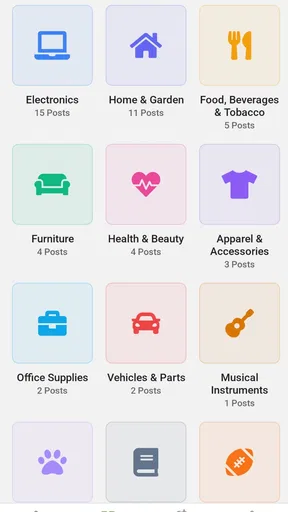
For a first-time buyer, the question “Can I trust every listing?” has a practical answer: treat each listing on its own merits. Read its details, assess whether the condition is explained, and clarify anything that could change your decision. The question “Is it only for fashion?” is also worth settling: although the published article’s strongest examples focus on clothing and style, ShopFever’s broader purpose is buying and selling new and used products, so I would not assume it is limited to apparel.
When I would choose another option
I would look elsewhere when I need an exact specification, a predictable retailer-backed process, or a product that must meet a particular technical or safety requirement. A specialist shop can make those details easier to verify, while a dedicated resale platform may be preferable if its tools and local audience better match the item. ShopFever is most compelling when flexibility and the possibility of finding or passing on a useful product matter more than a uniform catalogue.
My overall advice is to start with one modest goal: find a specific item or prepare one item to sell. Check the details, take time over any uncertainty, and judge the app by whether it helps you complete that task comfortably. With that measured approach, ShopFever can be a handy addition to a shopping routine; if you prefer every product to come with the same retailer, return path, and level of specification, another kind of store will probably feel more reassuring.
Pros
- User-friendly interface enhances shopping experience.
- Wide variety of products across categories.
- Exclusive deals and discounts for users.
- Secure payment options ensure safe transactions.
- Efficient customer service and support.
Cons
- Occasional app crashes disrupt shopping.
- Limited availability in some regions.
- Notifications can be overly frequent.
- Some items have delayed shipping times.
- In-app ads can be distracting.
FAQs for ShopFever
What is ShopFever and how does it work?
ShopFever is a mobile app designed to enhance your online shopping experience by offering exclusive deals, discounts, and cashback on a wide range of products. Users can browse through various categories, select items, and make purchases directly through the app. The app also provides personalized recommendations based on your shopping preferences.
Is ShopFever available on both Android and iOS platforms?
Yes, ShopFever is available for download on both Android and iOS devices. You can find the app on the Google Play Store for Android users and the Apple App Store for iOS users. Make sure your device meets the app's minimum system requirements for optimal performance.
Are there any subscription fees or hidden charges in ShopFever?
ShopFever is free to download and use. There are no subscription fees or hidden charges. However, some premium features may require in-app purchases. The app is designed to save you money through discounts and cashback, making shopping more affordable and enjoyable.
How secure is my personal and payment information on ShopFever?
ShopFever prioritizes user security by utilizing advanced encryption technologies to protect your personal and payment information. The app complies with industry standards to ensure that your data is handled safely and securely, giving you peace of mind while shopping.
What should I do if I encounter an issue or need support with ShopFever?
If you experience any issues or need assistance, ShopFever provides a dedicated customer support team available through the app. You can access the support section to find FAQs, troubleshooting guides, and contact options to get the help you need promptly.


